TCL Android TV Remote
- 4.6
- Rating
- 500.00K
- Installs
- Free
- Price
 Analysis by App-foxy
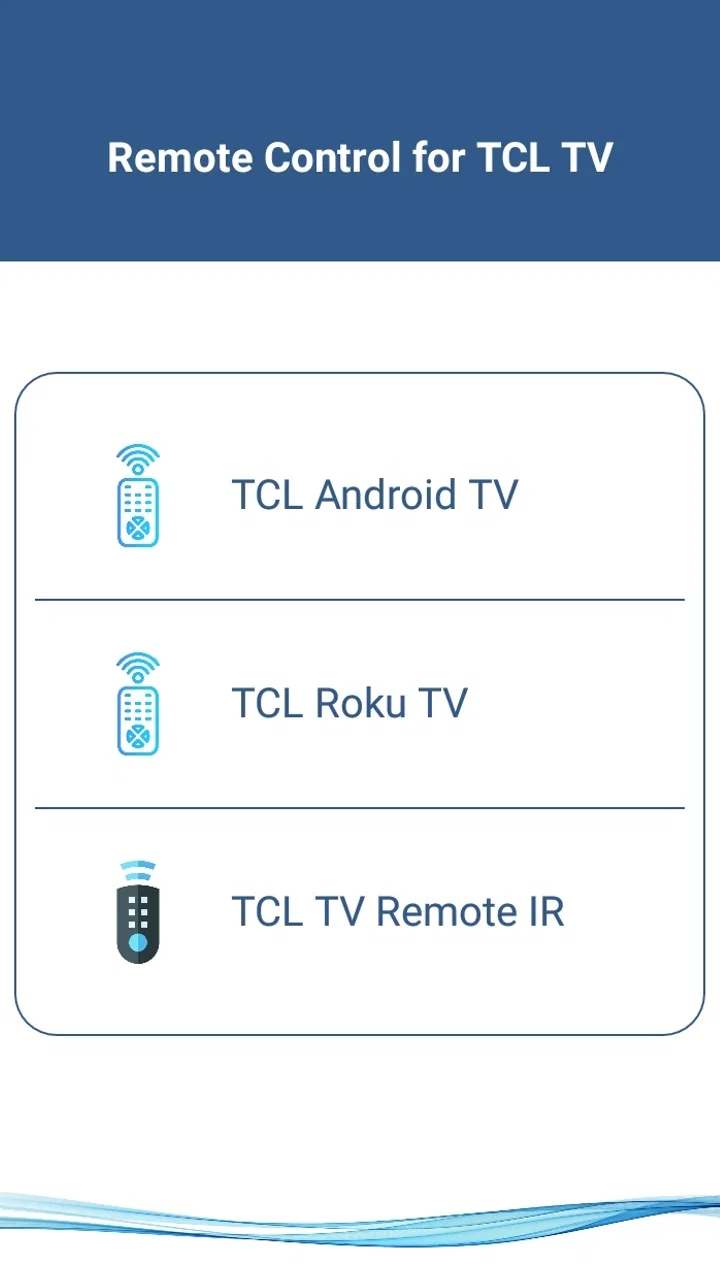
I tried TCL Android TV Remote as a practical replacement for a missing or misplaced television remote, and my first impression was straightforward: this is a focused House & Home utility rather than an overloaded smart-home platform. It is made by Naba, costs nothing to use, and is aimed at people who want to control a TCL Smart TV from an Android phone without spending time learning a complicated interface.
The appeal is easy to understand. A phone is usually nearby, while a physical remote can disappear between sofa cushions, stay in another room, or run out of batteries at the worst possible moment. This app turns that familiar phone into a remote-control option, which can be especially useful during everyday interruptions rather than as a complete replacement for every television accessory.
How the current app feels in everyday use
The app’s main promise is speed: install it, open it, and try to connect it to the television. That simple purpose works in its favor. I would not choose it for browsing a large collection of entertainment services or managing every device in a home. I would choose it when I need the basic television controls available on the device already in my hand.
You May Also Like

 Blood Strike: 2.5 Anniversary
Blood Strike’s Loadouts Turn Every Drop Into a Tactical Gamble
A close look at Blood Strike’s custom loadouts: how fast access to signature weapons reshapes its battle royale rhythm, rewards preparation, and narrows the gap between fights.

 Pandora - Music & Podcasts
Pandora’s Music Is Easy to Start, but Harder to Recover
Pandora’s strength is its low-effort path from a seed to a station. Its weak spot is how much confidence it asks you to place in connection, setup, and quiet recovery.

 8 Ball Pool
 Is Built on Rivalries, Rematches, and Routine
A close look at the rivalries, rematches, shared routines, and unanswered safety questions that turn a quick pool match into a persistent mobile community.

 Samsung Music
’s Quiet Strength Is Playing What You Already Own
Its reach comes less from spectacle than from dependable access to a personal library. That simplicity is both the app’s strongest retention engine and its ceiling.

 AccuWeather: Weather Radar
AccuWeather Review: A Quick, Clear Forecast for Everyday Decisions
For everyday plans, the best forecast is the one you can understand quickly. AccuWeather makes rain timing, radar, and local conditions easy to act on, with a few trade-offs.

 Hill Climb Racing
Why Hill Climb Racing Still Turns Crashes Into One More Run
A tiny car, a bumpy hill and one more upgrade: Hill Climb Racing keeps resurfacing because its simple chaos makes every near-miss feel personal.
More From Our News Desk



That distinction matters. A phone-based remote is most convenient when the TV is already set up and the phone can communicate with it. It is less appealing when I am sitting down for a long viewing session and want the tactile certainty of physical buttons. Swiping on glass does not provide the same blind operation as a conventional remote, especially when I want to adjust volume without looking away from the screen.
Naba presents this as a free app for everyone, and its broad compatibility target is reflected in the minimum operating-system requirement of Android 4.4. The current version is 20.0, so the project is not positioned as a one-off experiment that was abandoned immediately after launch. It first appeared on May 1, 2022, and the continued version line gives existing users a reason to check that their installed copy is current.
Its public reception is also encouraging without being a substitute for testing on a particular television. The app sits at a 4.6 average from around 40 thousand ratings, with roughly 475 written reviews and more than 500 thousand installs. Those figures suggest that many people find the basic idea useful, but remote apps remain sensitive to the exact TV model, network arrangement, and phone setup, so a strong overall score should be read as a positive signal rather than a guarantee.
The setup experience is where expectations should stay realistic
Before relying on it, I would prepare the television and phone rather than install the app at the last second. Both devices need to be in a situation where they can communicate. If the phone is using one connection and the TV is isolated on another, the app may not behave as expected even though both devices appear to be online.
My practical advice is to test the connection while the original remote is still available. Turn the TV on, open the app, and check whether the controls respond before putting the physical remote away. This small step avoids a frustrating problem: using a phone remote as the only way to wake or configure a television before knowing whether the pairing path works in that room.
If the first attempt fails, I would not immediately assume the app is broken. I would check that the intended TCL television is powered on, confirm that the phone is connected to the same home network where applicable, and close and reopen the app. Restarting the TV and phone can also clear a temporary discovery issue. These are ordinary troubleshooting steps, but they are particularly important with remote utilities because a connection problem can look exactly like a control problem.
Where it helps more than a spare physical remote
The strongest use case is the missing-remote emergency. Imagine arriving home with groceries, turning on the television, and discovering that the remote is buried under cushions or left in a bedroom. If the app connects successfully, the phone can handle the immediate task without searching the entire house.
It is also useful in a shared living room. A family member may have the physical remote while someone else wants to lower the volume, pause viewing, or change a basic setting. A phone-based option can reduce the small arguments that happen when one remote is treated as communal property.
Another less obvious advantage is that a phone is easier to locate at night. The screen can be illuminated, and the device is less likely to vanish into dark upholstery than a slim black remote. That convenience comes with a trade-off: the phone must remain charged, and using it as a remote may interrupt whatever else I was doing on the handset.
I also see value for visitors or temporary rooms where I do not want to buy another physical controller. For someone staying with relatives who own a compatible TCL Smart TV, a free remote app can be a sensible backup. I would still test it before depending on it, because temporary users usually have less time and less access to the TV’s original setup controls.
What the version history means for people already using it
The move to version 20.0 is relevant mainly as a sign of ongoing product evolution. It tells me that the app has passed through multiple iterations since its initial release, which is preferable to an unchanged utility that may not keep pace with modern Android behavior. However, a version number alone does not prove that every connection issue has been solved or that every TCL television behaves identically.
For an existing user, the sensible approach is to update when a newer version is available, then test the controls once rather than assuming the update changed nothing. A remote app can be critical at a very specific moment, so I prefer to verify volume, navigation, and power-related behavior before the physical remote goes missing.
People installing it on older Android phones may appreciate the low minimum requirement. At the same time, compatibility with an older operating system does not automatically mean the experience will be equally smooth on every old handset. Screen size, responsiveness, battery condition, and network reliability can all affect how comfortable a phone remote feels.
The important distinction is between confirmed current evidence and future expectations. The current release information supports the view that Naba continues to maintain the app. It does not justify promising a particular upcoming feature, redesigned layout, or new television compatibility. I would judge future updates by whether they make connection, control, and recovery more dependable—not simply by a larger version number.
Small habits that make the app more dependable
I recommend keeping the app easy to find rather than placing it in a deep folder. A remote utility earns its place through quick access, and searching for it while a TV is playing defeats much of its purpose. I would also avoid force-closing it immediately after a successful connection if I expect to use it again soon; reopening cleanly is often simpler when the app has not been aggressively restricted by the phone.
When several televisions are nearby, I would identify the target screen before tapping controls repeatedly. Sending commands to the wrong room is an easy mistake with any phone remote, especially when more than one compatible device is powered on. A quick visual check of the TV can prevent confusion over whether the command worked.
For households with unreliable Wi-Fi, I would treat this app as a convenience rather than the sole remote. Keep the physical controller available until the phone connection has proved stable in the exact room where the TV is used. This is one of the most important trade-offs: a free app can solve the missing-remote problem, but it cannot remove the dependency on a suitable communication path.
I would also keep the phone’s battery in mind. Watching television for hours while using the same handset for calls, navigation, or streaming can leave less charge for later. The app itself may be light in purpose, but the phone remains a shared device, not a dedicated controller sitting permanently on a coffee table.
How it compares with the usual alternatives
The obvious alternative is the original TCL remote. That remains better for tactile control, quick button location, and independence from the phone’s battery. If I watch television every day and the physical remote works reliably, I would keep using it as the primary option and treat this app as insurance.
A generic universal remote is another choice. It may control several brands or devices and can be more comfortable for long sessions, but it adds another object to buy, configure, and store. For a household that only needs a backup for a TCL Smart TV, the free phone approach is more economical and less cluttered.
Some users may already have a broader smart-home application that includes television controls. That route can make sense if the household wants one place for many devices. The downside is complexity: a dedicated TCL remote app is easier to understand when the only goal is controlling the television. I prefer the narrower tool when I do not need scenes, routines, or a full home dashboard.
Voice control can be convenient for certain commands, but it is not always suitable in a quiet room, around sleeping children, or when speech recognition misunderstands a request. A phone remote provides a more private manual option. On the other hand, it still requires me to look at and handle the phone, so it is not automatically better for every viewing style.
Where the experience can still fall short
The biggest limitation is not the price or the basic concept; it is the uncertainty that comes with device-specific remote communication. A successful experience depends on the TCL television being reachable and correctly recognized. If the app cannot see the TV, the controls are irrelevant until the connection issue is fixed.
Touch controls also change the rhythm of television use. Physical buttons have shape and spacing, allowing me to operate them by feel. A phone screen offers flexibility but less feedback. I may need to look down to find the right control, and that is slower when I am trying to make a quick adjustment during a program.
There is also a privacy and interruption consideration that applies to any phone-based controller. The handset may receive a call, notification, or message while I am using it. Even when the app continues working, switching away from it can make the remote less immediate than a dedicated device.
I would skip this app if I need a guaranteed controller for a television that cannot be tested beforehand, if my home network is frequently unavailable, or if I strongly prefer physical buttons. I would also look elsewhere if my real goal is a complete multi-brand home-control system rather than a focused TCL TV remote. In those cases, a physical universal remote or a broader platform may be the better fit.
Who should install it, and what to watch next
This app makes the most sense for TCL Smart TV owners who want a free backup, people who regularly misplace the original remote, and households where several family members need occasional access to basic controls. Its Everyone age rating also makes it suitable as a straightforward household utility rather than a specialized tool for a narrow audience.
I would be more cautious for someone buying a phone specifically to replace a remote permanently. Before making that decision, test the app with the exact television and room arrangement. If it responds quickly and remains convenient over several sessions, it may be enough. If the connection feels inconsistent or the touch layout slows you down, the original remote will probably remain the better daily choice.
When evaluating future updates, I would watch for practical improvements: clearer device discovery, easier recovery after a lost connection, dependable behavior after the TV sleeps, and a control layout that remains comfortable on different phone sizes. Those are the changes that would affect real use more than cosmetic adjustments.
My final view is positive but measured. TCL Android TV Remote is best understood as a useful backup and a convenient second controller, not a universal replacement that removes every need for the original remote. Naba’s free app has a clear purpose, a low Android entry point, and enough ongoing version development to deserve a trial from compatible TV owners.
I would install it before an emergency, test it while the physical remote is available, and keep the option that feels more reliable in daily life. For me, that makes the app worthwhile: it solves a very specific household annoyance without asking me to buy another accessory, while its limitations remain easy to understand.
FAQs for TCL Android TV Remote
01What features does the TCL Android TV Remote app offer?
The TCL Android TV Remote app provides a comprehensive suite of features, including easy navigation through your TV’s interface, volume control, and direct access to your favorite apps. It also allows users to use voice commands and offers a virtual keyboard for simplified typing, enhancing the overall TV viewing experience.
02Is the TCL Android TV Remote app compatible with all TCL TV models?
The app is designed to work with most TCL Android TV models. However, compatibility may vary based on the model and the software version of your TV. It’s recommended to check the app’s compatibility section on the app store before downloading to ensure it will work with your specific TV model.
03Does the TCL Android TV Remote app require an internet connection?
Yes, the TCL Android TV Remote app requires a stable internet connection to pair with your TV. Both the TV and your mobile device should be connected to the same Wi-Fi network. This ensures smooth operation and connectivity without any interruptions during use.
04How user-friendly is the TCL Android TV Remote app for first-time users?
The app is designed with user-friendliness in mind, featuring an intuitive interface that is easy to navigate. New users will find the setup process straightforward, with guided instructions for pairing the app with your TV. The layout is clean, making it simple for users of all tech levels to operate.
05Are there any privacy concerns associated with using the TCL Android TV Remote app?
The app requires some permissions to function optimally, such as accessing your network and microphone for voice commands. TCL prioritizes user privacy and data protection, adhering to strict policies. It's advisable to review the app’s privacy policy and permissions thoroughly to understand what data is being accessed and how it is used.
Pros
- User-friendly interface for quick navigation.
- Responsive controls with minimal lag.
- Customizable settings for personalized use.
- Supports voice commands for convenience.
- Compatible with various TCL TV models.
Cons
- Limited features compared to physical remote.
- Requires stable Wi-Fi connection.
- Occasional pairing issues with older models.
- No haptic feedback for button presses.
- Ads can be intrusive in free version.

TCL Android TV Remote
Gallery